
Absolute Beginner - This level is for individuals with no prior knowledge of the Welsh language. They have not yet started learning Welsh and are unfamiliar with basic vocabulary or grammar.
Mynediad | Entry (CEFR A1) - At this level, learners can understand and use familiar everyday expressions and very basic phrases. They can introduce themselves, ask and answer simple questions about personal details (e.g., where they live, people they know), and interact in a basic way provided the other person speaks slowly and clearly.
Sylfaen | Foundation (CEFR A2) - Learners can understand sentences and frequently used expressions related to areas of most immediate relevance (e.g., basic personal and family information, shopping, local geography, employment). They can communicate in simple and routine tasks requiring a direct exchange of information on familiar matters and describe in simple terms aspects of their background and immediate environment.
Canolradd | Intermediate (CEFR B1) - At this level, learners can understand the main points of clear standard input on familiar matters regularly encountered in work, school, leisure, etc. They can deal with most situations likely to arise while traveling in a Welsh-speaking area, produce simple connected text on topics that are familiar or of personal interest, and describe experiences, events, dreams, hopes, and ambitions and briefly give reasons and explanations for opinions and plans.
Uwch | Advanced (CEFR B2) - Learners can understand the main ideas of complex text on both concrete and abstract topics, including technical discussions in their field of specialization. They can interact with a degree of fluency and spontaneity that makes regular interaction with native speakers possible without strain for either party. They can produce clear, detailed text on a wide range of subjects and explain a viewpoint on a topical issue giving the advantages and disadvantages of various options.
Rhugl | Fluent (CEFR C1/C2) - At the C1 level, learners can understand a wide range of demanding, longer texts and recognize implicit meaning. They can express themselves fluently and spontaneously without much obvious searching for expressions, use language flexibly and effectively for social, academic, and professional purposes, and produce clear, well-structured, detailed text on complex subjects.
At the C2 level, learners can understand with ease virtually everything heard or read. They can summarize information from different spoken and written sources, reconstructing arguments and accounts coherently, and express themselves spontaneously, very fluently, and precisely, even in complex situations.
- In a channel right click (hold on mobile) your name
- Select Edit Server Profile
- Enter your new nickname in the Server Nickname box
- Click Save Changes
The [CG] stands for "Croeso i Gywiriadau" (Corrections Welcome). This means the member is open to receiving corrections for any mistakes they might make. However, please provide corrections in a way that is friendly, helpful, and does not interrupt an ongoing conversation.
1. At the top of the channel list, select Channels and Roles.
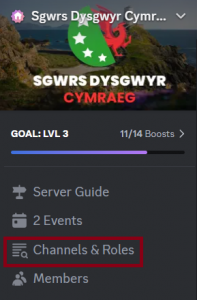
2. Under this section navigate to Browse channels.
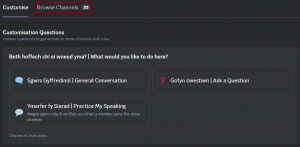
3. There is a checkbox next to each channel name, ensure this is box is checked. This will then display in your channel list.

Croeso | Welcome;
- Amdanat ti | About you: "Amdanat ti" is the introduction channel where you can introduce yourself by sharing a bit about who you are and how long you have been learning Welsh.
- Prif Sgwrs | Main Chat: "Prif sgwrs" is the main chat channel, where conversations are bilingual and include a mix of all levels and dialects. It serves as a common space for general discussion.
Help ac arweiniad | Help and Guidance;
- Adnoddau | Resources: "Adnoddau" is our resource section, where you can find useful resources organised by type.
- Cwestiynau | Questions: "Cwestiynau" is a space dedicated to asking questions. The main chat can become quite busy, making it difficult to scroll through and find answers. By asking in this forum, you can easily locate your questions and answers later.
- Bwrdd Trafod | Discussion Board: "Bwrdd Trafod" is our discussion board, where you can explore topics like music, culture, history, and more. Members can request new topic headers by sending a direct message to the server admin.
- Help Cyfieithu | Translation Help: "Help Cyfieithu" is a space for requesting assistance with translating phrases from English to Welsh or verifying the accuracy of your translation.
- Digwyddiadau Lleol︱Local Events:A space to share all things Welsh - whether it’s a local sgwrs, a community gathering, or a chance to catch a glimpse of the Mari Lwyd.
Ystafelloedd lefel | Level Rooms;
- Absolute Beginner: "Absolute Beginner" is a welcoming space for those who are just starting their Welsh language journey, free from the pressure of more advanced levels. It’s designed to help you build confidence in speaking throughout the server.
- Mynediad Lounge: "Mynediad Lounge" is a safe space for those at the Mynediad level. We’ve also included the Sylfaen role in this channel to help guide you on your learning journey.
- Sgwrs Iaith Cymraeg: "Sgwrs Iaith Cymraeg" is a Welsh-only space where English is not allowed. It's intended for when Welsh conversations are taking up too much space in the main chat. This space is also great for immersing yourself in the language and includes a dedicated area for those at a more advanced level.
Sianel Llais | Voice Channels;
- Ystafell Sgwrs | Chat Room: "Ystafell Sgwrs" is our main voice chat channel, where biweekly chat events are hosted. Members can use this channel at any time to practice their speaking skills, improve pronunciation, or simply have a general chat.
- Grŵp Astudio | Study Group: "Grŵp Astudio" is a voice channel designed for group study. This can include anything from helping each other with treigladau, working through a Dysgu Cymraeg book, or exploring new aspects of Welsh history.
- Llwyfan | Stage: "Llwyfan" is the stage for major events and is also where our regular reading group sessions are held.
Dysgu ac Ymarfer | Learning & Practice;
- Gair y Dydd | Welsh Word of the Day: "Gair y Dydd" is a space where a new Welsh word is posted daily to help expand your vocabulary.
Cyfaill i Fyny | Buddy up;
- Cyfaill Iaith | Language Buddy: "Cyfaill Iaith" is a space to find a language buddy, who could be at your level or more advanced. Having a language buddy offers benefits such as personalized practice, immediate feedback, and the opportunity to improve your speaking and listening skills through regular interaction.
- Sgwrsio Cyfeillion | Buddy Chat: "Sgwrs Cyfeillion" is a voice channel for up to 2 participants, allowing language buddies to engage in one-on-one conversations. You can share your screen and collaborate to enhance your knowledge and understanding of the Welsh language.
Cefnogaeth | Support;
- Adborth | Feedback: "Adborth" is our feedback channel. If you have ideas for improvements or suggestions for new features on our server, we’d love to hear them.
- Newyddion | News: "Neweddyion" is our announcements channel. We use it to notify everyone about new rooms, upcoming events, or any changes to the server.
You can find events in the Events tab located at the top of the channel list. The tab may appear differently depending on the device you are using;
On Desktop

On Mobile

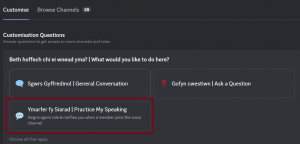
You can receive notifications when a member joins a chat by adding the Sgwrs role, so you don't miss an opportunity to practice. To add this role, please follow the steps below:
1. Navigate to Channels and Roles at the top of the channel list.
2. Under the customise tab you will see Beth hoffwch chi ei wneud yma? | What would you like to do here?

3. Select Ymarfer fy siarad | Practice my Welsh, this will add the sgwrs role to you.
1. Recognised Languages
Welsh and English are the official languages of this server.
Other languages may be discussed in Welsh or English only.
2. Learning and Corrections
Mistakes are part of learning.
Do not correct others unless:
• They ask for help
• Their nickname includes [CG] (Croeso i Gywiriadau)
Using both Welsh and English helps learners understand and grow.
Want Corrections? • Add [CG] to your nickname to show you're open to corrections
Change nickname: https://mashtips.com/change-nickname-on-discord
3. Respectful Conversation
• Be kind, inclusive, and open to dialects
• No hate speech, aggressive behaviour, or NSFW content
• Politics, religion, and beliefs may be discussed respectfully — no preaching or pushing views
• Agree to disagree — respect is essential
4. Disruptive Behaviour
• If a member creates a hostile environment that causes long-term members to leave,
they may be removed at admin discretion. • Even though this server is all ages, we expect you to behave like an adult. posting to intentionally provoke others may result in removal at the admin's discretion
5. Chat Etiquette
• Avoid ALL CAPS — it reads as shouting
• No spamming or flooding channels
• Display names must be appropriate for all ages
6. Moderation and Advertising
• Contact mods or admins privately with concerns
• Do not air grievances publicly
• Advertising requires prior approval from Alecs ap Wyn
Muting notifications in Discord can be done in several ways, depending on whether you want to mute an entire server, specific channels, or direct messages. Here are step-by-step instructions for both mobile and desktop versions of Discord;
On Desktop:
- Mute an Entire Server:
- Open Discord and go to the server you want to mute.
- Right-click on the server icon in the left sidebar.
- Select "Mute Server".
- Choose the duration for which you want to mute the server (e.g., 15 minutes, 1 hour, 8 hours, 24 hours, or until you manually unmute it). - Mute a Specific Channel:
- Open Discord and navigate to the server containing the channel.
- Right-click on the channel name.
- Select "Mute Channel".
- Choose the duration for which you want to mute the channel. - Mute Direct Messages (DMs):
- Open Discord and go to the - Direct Messages section (the icon at the top left that looks like a speech bubble).
- Right-click on the name of the person whose DMs you want to mute.
- Select "Mute [username]".
- Choose the duration for which you want to mute the DMs. - Adjust Global Notification Settings:
- Click on the gear icon at the bottom left to open User Settings.
- Go to "Notifications".
- Adjust the settings based on your preferences (e.g., disabling all notifications, enabling only mentions, etc.).
On Mobile:
- Mute an Entire Server:
- Open the Discord app and go to the server you want to mute.
- Tap on the server name at the top of the screen.
- Select "Notifications".
- Choose "Mute [server name]" and select the duration. - Mute a Specific Channel:
- Open the Discord app and navigate to the server containing the channel.
- Press and hold the channel name.
- Select "Mute Channel".
- Choose the duration for which you want to mute the channel. - Mute Direct Messages (DMs):
- Open the Discord app and go to the Direct Messages section (tap on the speech bubble icon at the bottom).
- Press and hold on the username of the person you want to mute.
- Select "Mute [username]".
- Choose the duration for which you want to mute the DMs. - Adjust Global Notification Settings:
- Tap on your profile icon at the bottom right to open User Settings.
- Go to "Notifications".
- Adjust the settings based on your preferences (e.g., disabling all notifications, enabling only mentions, etc.).
Most users will use Duolingo as their primary learning platform. Here are a few other platforms we recommend:
Say Something in Welsh: An audio-based language course designed to help you speak Welsh from the very first lesson. It emphasizes listening and speaking, using real-life conversations to improve fluency and confidence.
Dysgu Cymraeg | Learn Welsh: A comprehensive platform offered by the National Centre for Learning Welsh, providing a wide range of resources, from beginner to advanced levels. It includes online courses, live classes, and self-study materials, catering to different learning styles.
Glossika: A language learning tool that focuses on sentence structure and repetition to help you internalize Welsh grammar and vocabulary. It uses an adaptive learning algorithm to personalize lessons based on your progress and proficiency.
Dafad is our bot designed to assist you by providing a mutations chart, helping you translate what someone has said and offering information on what causes a mutation. Here are Dafad's available commands:
- /treigladau: Displays a treiglad (mutation) rule menu visible only to you.
- /siart: Sends a treiglad chart that only you can see.
- /report: Submits an anonymous report to the Admin.
- Translate: To translate, right-click (or hold on mobile) and select "Apps - translate." You will be given two options: English or Welsh.
To use these commands in Discord, type a forward slash / followed by the command name (e.g., /siart) in the message box and press Enter to activate it.
You can reach us by tagging @Gweinyddwr | Admin or @Cymedrolwr | Moderator, or by using the contact methods below:
Gweinyddwr | Admin;
Alecs ap Wyn
- Tag: @Alecs ap Wyn
- Email: alecs@sgwrsdc.wales
Cymedrolwr | Moderators;
5qrl
- Tag: @5qrl
- Email: 5qrl@sgwrsdc.wales
Mushroommunk
- Tag: @Mushroommunk [CG]
- Email: mushroommunk@sgwrsdc.wales
Nia
- Tag: @Nia
- Email: nia@sgwrsdc.wales
Blaze
- Tag: @Blaze [CG]
- Email: blaze@sgwrsdc.wales
When we're looking to add new team members, we will post in the Newyddion | News channel. Moderators are selected based on their activity within the server, and current Moderators can recommend candidates for consideration. If you're interested in joining the team, you can also directly message the server Admin, Alecs ap Wyn, to express your interest.
